Inicio / Soporte / User Forum / Settings - Image / Remove the BIG green dot on the top right of the image

Navigation


Remove the BIG green dot on the top right of the image

You need to be logged in to get access to the forums. You can do so here.

Author Message

Net Vicious

Posts: 0

Remove the BIG green dot on the top right of the image

27 febrero 2009 14:18:25

Hi!

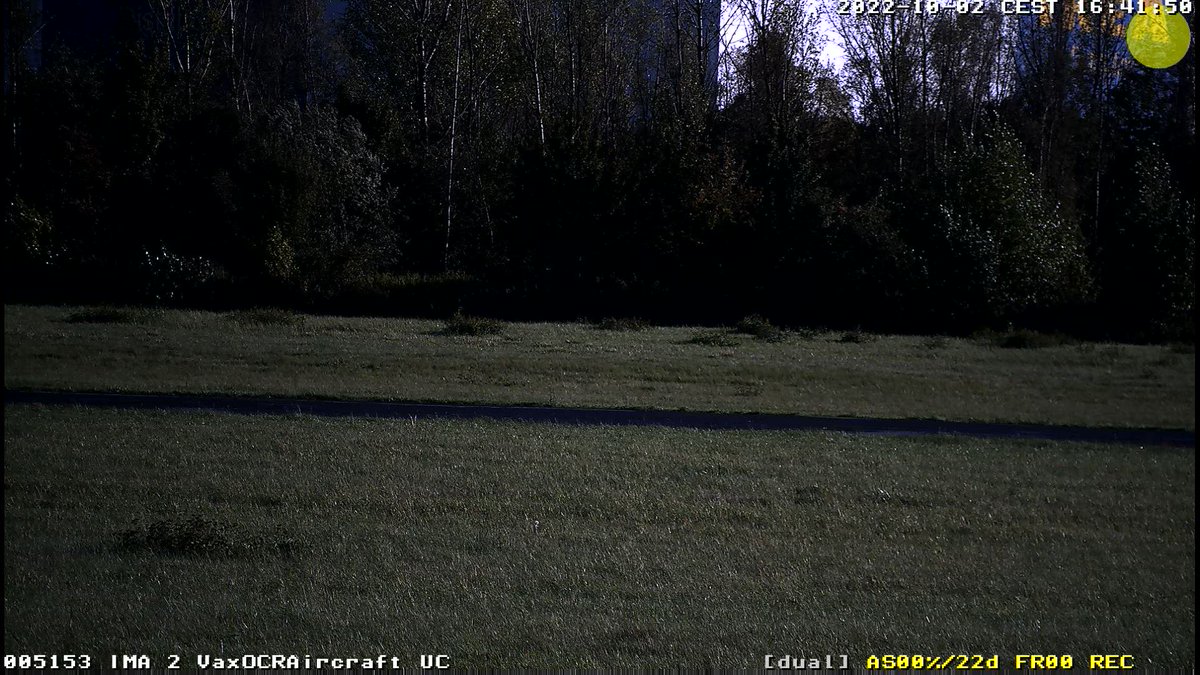
I want to remove the big green dot of the image. It seems this big dot it's used to show the user the alarm status.

I removed all the symbols, bars, visual alarm, etc, but the big dot it's still there.

Thx.

user815

Posts: 1

BIG green dot ...

27 febrero 2009 15:59:05

go to:
>Setup Menu >Recording >Recording Status Symbol

Net Vicious

Posts: 0

ok

27 febrero 2009 16:45:12

Ok, thanks a lot.

It was in a different menu.

Kim Wilkins

Posts: 0

Yellow Dot

06 mayo 2009 18:14:28

Mine was a yellow dot not green but the same solution worked.

Ndrew
Mr.

Posts: 0

the dot of rec status symbol

07 mayo 2009 08:08:25

When being green - the camera is armed, but the recording is off.
yellow - the camera is armed and the recording is on, but there are no events at the moment or there is a continious recording
When the dot is red - then the event is being recorded at the moment.

BR,
Andrii Glukhov
UNITOP LTD
Kiev, Ukraine

Paul Duffield
Mr.

Posts: 0

I don't have the RECORD symbol option on my M24

30 enero 2012 22:48:09

Hi,
I can't find the option to remove the RECORD symbol in setup/record on my M24. I've checked all my other options on setup/admin but I can't remove it.
I have another M24 L11 camera here and that has the option to remove it, but not this one.
Can't it be removed?
Thanks,
Paul

Matteo Lugaresi
Sig.

Posts: 5

Re:

31 enero 2012 09:29:21

Try with these strings:

DISABLE
http://[ip_cam]/control/control?set&section=recording&recsymbol=disable

ENABLE
http://[ip_cam]/control/control?set&section=recording&recsymbol=enable

Hope this helps!